Snapshot
⌃⌥⌘SFreeze every display and draw on it while you talk. You can hide the overlay, switch to another window and take the next shot in the same capture.
 voice-annotate
Screen capture for coding agents. Draw on your screen while you talk, then paste. Your agent gets the annotated screenshots and a transcript that links each mark to what you were saying.
Free and open source. macOS, Windows and Linux.
Draw on the screenshot
# Screen capture · Snapshot · 0:19
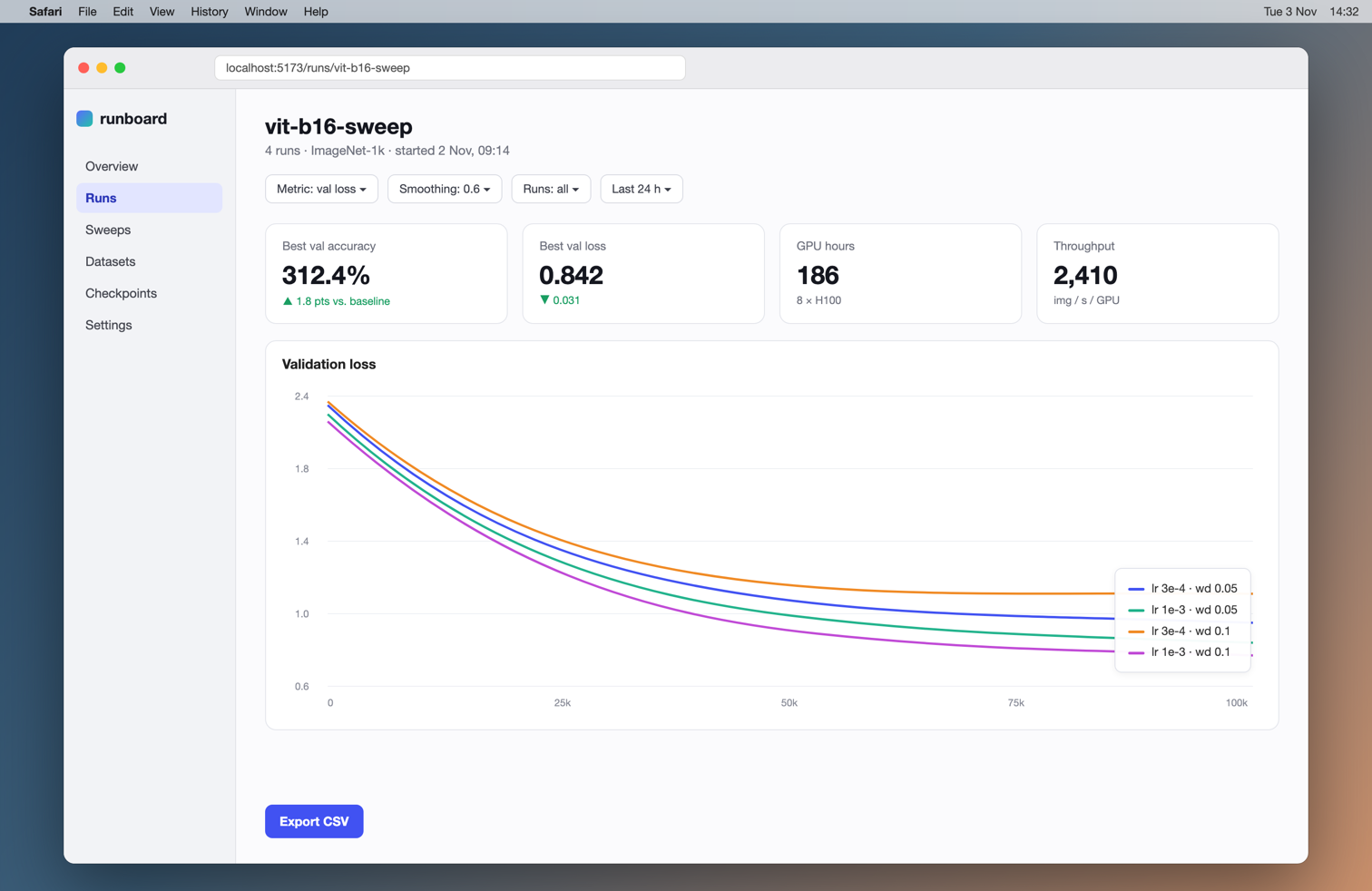
Numbered marks (#1, #2, …) are the user's own annotations, cited where they were drawn.
- frame 1 · 1568×1018 · frame_01.png
## Transcript
[00:00 · frame 1] Okay. Quick review of the run dashboard. This best [#1 circled (301,290)-(450,340) in frame 1] accuracy says 312%. That has to be a units bug. It's probably multiplying by 100 twice. The legend [#2 circled (1241,634)-(1461,784) in frame 1] here sits right on top of the curves. Can we move it below the chart? And this export [#3 box around (290,908)-(425,966) in frame 1] button is floating down here. It should go [#4 arrow from (446,910) pointing at (809,230) in frame 1] up next to the filters.
Works with and any other agent you can paste into
⌃⌥⌘S takes a Snapshot: your screen freezes so you can draw on it. ⌃⌥⌘R starts a Walkthrough and keeps recording while you work. The microphone turns on with both.
Circle the number that is wrong, or draw an arrow to where a button should go. Each mark gets a number on the screenshot. ↩ finishes the capture.
A few seconds later your clipboard has the screenshots and a transcript. Paste with ⌘V. Each mark is cited at the word you were saying, with its pixel coordinates.
Freeze every display and draw on it while you talk. You can hide the overlay, switch to another window and take the next shot in the same capture.
Record while you keep working. Hold a modifier key to draw marks that fade like a laser pointer. Agents read images, not video, so the recording is turned into up to 30 keyframes.
Voice only. Speak a prompt and paste it as plain text.
Any agent you can paste into. Terminals (Claude Code, Codex) take the transcript text, which lists the image files by path. Chat apps and browsers (Claude, ChatGPT, Cursor) take the attached files. If one target wants something else, the tray menu can copy any recent capture again in another format, including a single composite image.
On an Apple Silicon Mac a one-minute recording takes about five seconds once the model has warmed up. On Windows and Linux it runs on the CPU with a smaller English model by default; with an NVIDIA GPU and CUDA it uses the large one.
Not yet. Transcription is set to English.
The modes and the output are the same. The app is a separate implementation with its own shortcuts. On Linux with X11 the capture toolbar is visible in walkthrough keyframes, and the capture tells the agent so. On Wayland only Snapshot and Dictation work, and that mode is new. Details are in the README.
Free and open source under the MIT license.
curl -fsSL https://raw.githubusercontent.com/andropar/voice-annotate/master/python/packaging/install-linux.sh | shx86_64, Ubuntu 22.04 or newer · or get the .tar.gz
~/.local and adds a menu entry. Nothing needs root.On first start the app downloads a speech model once (about 0.5 GB). After that it works offline.